
Want to know where the cheapest fuel is in your area? Want to work out how much fuel your vehicle actually uses? Want to know the best sat nav apps? How about traffic alert apps? The following apps are all you need.
Ongoing events in the Middle East have prompted a surge in fuel prices, with petrol reaching 140p per litre and diesel exceeding 160p per litre, at time of writing.
Whilst any timeline for prices to come down appears elusive, there are steps you can take to minimise the impact of spiralling oil imports chiefly by finding the best value fuel in your area.
With this in mind, below you’ll find our pick of the best fuel price tracking apps.
Alongside fuel price apps we’ve also listed some of the best apps for tracking fuel use. These help you work out how fuel efficient your vehicle is in the real world (and not just going by the manufacturer’s data).
We’ve also detailed some of the best sat nav/navigation apps in 2026, so you can get from A to B in the quickest, most efficient way.
Last but not least, we’ve listed some of the best UK traffic alert apps available now, so you can avoid congested areas and reach your destination quickly.
Android or iPhone apps?
All the apps listed are available on both Android and iOS, except Apple Maps which is only available on iOS devices (or any desktop PC).
Best fuel price tracking apps
PetrolPrices UK & France (Top Choice for Prices): Specifically created for the UK, this app helps find the cheapest fuel near you (or a particular by postcode), offering user-updated pricing, garage locators, and even maintenance reminders.
Cost: Free (with ads)
Other apps: A number of other apps provide local fuel price data. Most (if not all) of these use publicly available data from Gov.uk.
Best fuel tracking apps
Fuelio (Best for Analytics): A highly rated, free, practical app for logging mileage, fuel consumption, and costs. It can also track multiple vehicles. User reviews mention the clean, easy-to-navigate interface, and the fact you can enter a route and plan where to refuel along the way.
Cost: Free (with in-app purchases)
FillUp (Best for Mileage Log): This simple, easy-to-use app is designed with United States users in mind. However, it can be used by UK motorists too (or indeed drivers from elsewhere) just imagine that the ‘$’ is a pound sign!
Cost: Free
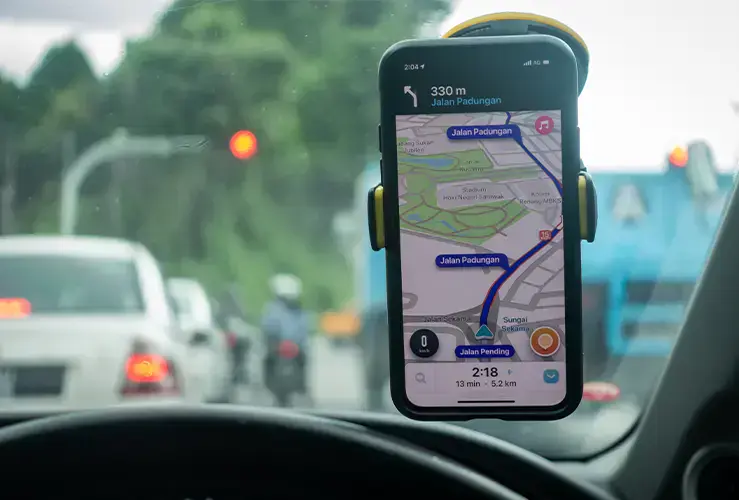
Image credit: MuhammadFadhli - stock.adobe.com
Best sat nav/navigation apps in 2026
Waze Navigation & Live Traffic / Waze App UK (Best for Navigation): This well-established app combines live traffic with a powerful "fuel stations" feature that ranks fuel prices along your route. Waze Navigation app also gives you real time traffic updates (including hazard alerts) and has been praised for its easy-to-use interface. This Google-owned app has more than 20 years of development under its belt, so it has more pedigree than most comparable sat nav apps for cars.
Cost: Free (with ads)
Google Maps (Best GPS Navigation for Overall Motoring): Whether moving by foot, bike, bus, train, or car, chances are you’ve used Google Maps. For motorists it’s especially useful, with accurate turn-by-turn directions, live traffic updates, and reliable route planning across motorways, A-roads, and city streets. The app makes avoiding congestion a cinch thanks to real-time traffic data and automatic rerouting.
Drivers can also locate nearby petrol stations, parking, and services along motorways. Speed limit displays and lane guidance add extra convenience. While occasional GPS lag or overly cautious rerouting can occur, the Google Maps app remains the go-to sat nav app (free to all) for everyday driving in the UK.
Cost: Free
Apple Maps (Best Option for iPhone/CarPlay Users) is a refined navigation app that serves UK motorists well, but only ones who use iPhones and/or CarPlay!
It provides clear turn-by-turn guidance, helpful lane assistance, and voice directions that are easy to follow on motorways and through complex urban junctions.
Real-time traffic information helps drivers avoid delays on busy routes. The map layout is clean and easy to read, with useful additions such as speed camera alerts and detailed junction views. Although its search results can sometimes be less comprehensive than competitors, Apple Maps remains a reliable option.
Cost: Free
Quick FAQ: How to connect iPhone to car?
You can connect your iPhone to your car using CarPlay (either wired or wireless), Bluetooth, or an AUX/USB cable. CarPlay delivers the best experience, allowing you to use apps on the car screen by plugging into the USB port or via Settings > General > CarPlay. Bluetooth enables both hands-free calling and music.
Image credit: microstock77 - stock.adobe.com
Best traffic alert apps
Note that Google Maps and Waze both have traffic alert functionality, as well as being solid navigation apps, and are probably more than enough for most motorists. Indeed, these two applications are arguably among the most useful (and best) Android auto apps available. They’re also available on iOS.
TomTom Maps & Traffic (Best for Locating Speed Cameras): Excellent for live traffic and speed camera alerts, making it great for those who want to make sure they don’t break any speed limits. Users love the visual and voice alerts. However, some users still hanker after the previous incarnation, AmiGo (to the detriment, arguably, of the overall rating).
Note that TomTom Maps & Traffic, as the name suggests, is also a solid navigation/sat nav app - free to all.
Cost: Free